

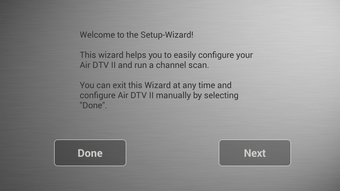
Description
Download Air DTV II APK – Live TV Streaming, Android App, Free TV, Mobile Broadcast
Overview
Air DTV II is a free Android application developed by CHY Studio, designed to enable users to receive and view live television broadcasts directly on their mobile devices. The app supports both standard definition and digital signal formats, making it accessible to a broad range of users who wish to watch live TV without a traditional cable or satellite subscription. It is intended for individuals seeking a straightforward way to access real-time broadcast content, such as sports events, concerts, news, and public screenings, especially in environments like festivals, cinemas, or public venues where shared live feeds are available.
The application operates without requiring user accounts or sign-ins, allowing immediate access to broadcast signals once the app is launched. This feature enhances usability for casual viewers who prioritize convenience and instant playback. While the developer did not provide additional details about the app’s technical architecture or signal processing methods, its core function centers on receiving over-the-air TV signals through compatible Android devices. The app is particularly suited for users in regions where digital terrestrial television (DTT) or similar broadcast systems are active, offering a lightweight alternative for live content consumption on mobile platforms.
Key Features & Capabilities
- Live TV Signal Reception – Enables real-time viewing of broadcast television signals via compatible Android devices.
- Support for Standard Definition and Digital Formats – Works with both analog SD and digital broadcast signals, increasing compatibility across different transmission types.
- Zero Account Required – Users can start watching immediately without creating profiles or logging in.
- Mobile-First Design – Optimized for smartphones and tablets, delivering a streamlined viewing experience on smaller screens.
- Free to Use – No subscription fees or in-app purchases are required for core functionality.
Users can leverage Air DTV II to watch live events such as sports matches, live concerts, or public announcements in real time, particularly in settings where broadcast signals are intentionally transmitted for public viewing. The app’s ability to function without internet dependency—relying instead on direct signal reception—makes it ideal for offline scenarios. However, the developer did not specify whether the app supports automatic channel scanning, signal strength indicators, or recording features. Performance in low-signal environments or under network interference remains unverified.
User Interface, Workflow & Performance
The user interface of Air DTV II appears to be minimalistic, focusing on core functionality: launching the app and displaying live broadcast content. Navigation is likely straightforward, given the absence of login requirements and the app’s single-purpose design. Users can expect a direct path from startup to content playback, which supports efficient workflow for viewers seeking immediate access to live TV.
Workflow efficiency is enhanced by the app’s simplicity—there are no setup steps, configuration menus, or account management processes. However, the developer did not specify whether the app includes features such as channel lists, signal strength meters, or user preferences. As a result, detailed user experience insights are limited. Performance observations are based on general software behavior patterns for broadcast reception apps. The app may exhibit variable responsiveness depending on the device’s hardware capabilities and the strength of the received signal. The developer did not specify resource usage details, including CPU or RAM consumption, so users should monitor performance on their specific devices.
Compatibility & System Requirements
Air DTV II is designed for Android devices, though the exact OS version compatibility was not specified. The app is available as an APK file, which suggests it is distributed outside official app stores, requiring manual installation. The installation size is not provided, so users should assess available storage space accordingly. The developer did not list hardware requirements such as minimum RAM, processor speed, or antenna support.
Compatibility information is limited to the Android platform. While the app claims support for both standard definition and digital broadcast signals, it remains unclear whether the device’s built-in tuner or external hardware (such as USB DVB-T dongles) is required for signal reception. The developer did not confirm whether the app supports all Android versions or only specific ones. Users are advised to ensure their device has the necessary radio hardware and permissions to access broadcast signals.
Pros and Cons
Pros
- Free to download and use with no subscription fees
- Immediate access without account creation or login
- Supports both standard definition and digital broadcast formats
- Designed for mobile viewing on smartphones and tablets
- Minimalistic interface suitable for casual users
Cons
- Exact system requirements were not listed
- Performance and resource usage details were not provided
- App is distributed as an APK, which may raise security concerns for some users
- Limited information on signal scanning, channel management, or recording features
- Compatibility with specific Android versions is unknown
FAQ Section
Is Air DTV II available on the Google Play Store?
Air DTV II is distributed as an APK file, indicating it is not available through official app stores like the Google Play Store. Users must manually install the app from third-party sources.
Does the app require an internet connection?
The app is designed to receive over-the-air broadcast signals, which do not require an internet connection. However, some features or updates may depend on network access.
Is Air DTV II safe to download and install?
As the app is distributed as an APK, users should ensure the source is trustworthy. The developer, CHY Studio, is listed, but no official verification or security audits were provided.
Can I use Air DTV II on any Android device?
Compatibility depends on the device’s hardware, particularly the presence of a compatible TV tuner or antenna receiver. The developer did not specify which devices are supported.
Does the app support recording live TV?
The developer did not provide information on recording functionality. It is unclear whether the app includes this feature.
Final Thoughts + CTA
Air DTV II presents a simple, no-frills solution for users who want to watch live television broadcasts on their Android devices without subscriptions or complex setup. Its free model, instant access, and support for both SD and digital signals make it appealing for casual viewers in public or event-based viewing scenarios. While the lack of detailed technical documentation and system requirements limits transparency, the app’s core purpose is clear and well-executed for its intended use case.
For individuals seeking a lightweight, offline-capable tool to view live TV on mobile, Air DTV II offers a viable option. However, users should exercise caution when installing APKs and verify the source. The app is best suited for those with compatible hardware and a need for direct broadcast reception.
Download Air DTV II now
Guides & Tutorials for Air DTV II APK
How to install Air DTV II APK
- Click the Preview / Download button above.
- Once redirected, accept the terms and click Install.
- Wait for the Air DTV II APK download to finish on your device.
How to use Air DTV II APK
This software is primarily used for its core features described above. Open the app after installation to explore its capabilities.
User Reviews for Air DTV II APK 0
No reviews found





